

Description
Download Video to Mp3 Converter – video to audio converter, mp3 converter, offline video to audio, no internet video to audio, convert video to mp3
Overview
The Video to Mp3 Converter app is a desktop-oriented utility designed to extract audio from video files and convert them into MP3 format without requiring an internet connection. This functionality makes it ideal for users who need to convert video content into standalone audio files for offline listening. The app supports a variety of video file formats, enabling users to extract soundtracks from videos sourced from different platforms or local storage. It is particularly useful for content creators, podcast enthusiasts, and individuals who want to repurpose video material into audio-only tracks for playback on portable devices or music players.
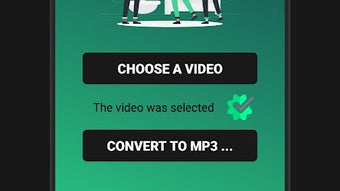
The software targets consumers and casual users who prioritize convenience and offline accessibility. It allows users to convert videos to MP3 with minimal steps—selecting the file and pressing a single "Convert" button. The resulting audio files are saved directly to the device’s file system, ensuring easy access and organization. While the developer did not provide additional details about the application’s background or development history, its core purpose is clearly focused on offline audio extraction.
Key Features & Capabilities
- Offline Conversion – Extracts audio from video files without requiring an internet connection, ensuring privacy and uninterrupted use.
- Multiple Video Format Support – Compatible with various video file types, allowing conversion from diverse sources.
- MP3 Output – Converts extracted audio into standard MP3 format, widely supported across devices and media players.
- Simple One-Click Conversion – Streamlines the process with a minimal user interface and a single "Convert" button.
- Local File Storage – Saves converted audio files directly to the device’s file system for immediate access.
These capabilities make the app suitable for real-world scenarios such as converting educational videos into audio lectures, extracting music from video clips, or creating audio backups of video content. The workflow is designed to be intuitive, minimizing user effort. Since no external processing is involved, the conversion process remains secure and private. The developer did not specify advanced editing or batch conversion features, but the core functionality is focused on reliability and simplicity.
User Interface, Workflow & Performance
The user interface appears to be straightforward, emphasizing ease of use with minimal navigation complexity. Users are expected to locate their video file through a file picker, initiate conversion with a single action, and retrieve the output from the device’s file system. The workflow is optimized for speed and simplicity, aligning with the needs of non-technical users.
Performance details were not specified by the developer. However, based on general software behavior patterns, the app likely processes files in real-time using local device resources. The conversion speed will depend on the video file size, format, and the device’s processing power. The developer did not provide information on CPU or RAM usage, so exact performance behavior remains unknown. Stability during conversion was not described, but the absence of internet dependency suggests reduced risk of interruptions.
Compatibility & System Requirements
The software is designed for Android devices and is compatible with the specified operating system version. The installation package size is 12.5 MB, indicating a lightweight application that does not require significant disk space. The developer did not specify exact system requirements such as minimum RAM, processor type, or storage availability. Compatibility information was partially provided, and users are advised to ensure their device meets general Android standards for running applications.
Since the app is intended for offline use, it does not rely on cloud services or online APIs. This reduces dependency on network conditions and enhances usability in low-connectivity environments. However, the lack of detailed hardware or software prerequisites means users should proceed with caution if their device is older or has limited resources.
Pros and Cons
Pros
- Operates entirely offline, ensuring privacy and no data transmission.
- Supports multiple video formats for broad compatibility.
- Converts videos to MP3 with minimal user input.
- Small file size (12.5 MB) makes it easy to install and manage.
- Free to download and use, with no in-app purchases or subscriptions.
Cons
- Exact system requirements were not listed.
- Performance and resource usage details were not provided.
- May lack advanced features like batch processing or audio editing.
- Limited to Android platform; no support for Windows or Mac.
- No information on update frequency or long-term maintenance.
FAQ Section
Is the Video to Mp3 Converter app safe to use?
The app is designed to operate offline and does not require access to personal data or cloud services. As it runs locally on the device, it minimizes exposure to external threats. However, users should download the APK from trusted sources to avoid potential security risks.
Can I convert videos to MP3 without an internet connection?
Yes, the app is specifically designed for offline use. All conversion processes occur locally on the device, eliminating the need for an internet connection.
Does the app support batch conversion?
The developer did not specify whether batch conversion is supported. The primary workflow appears to involve one file at a time.
Is the app available for Windows or Mac?
Based on the provided information, the app is only compatible with Android devices. There is no indication of versions for Windows or Mac.
How often is the app updated?
Update frequency was not disclosed. Users are advised to check for updates manually through trusted app sources.
Final Thoughts
The Video to Mp3 Converter app delivers a focused, reliable solution for converting video files to MP3 format without relying on the internet. Its lightweight design, free access, and straightforward workflow make it a practical tool for users seeking to extract audio from videos for personal use. While it lacks advanced features and detailed technical specifications, its core functionality is well-executed for basic conversion needs. The app is particularly beneficial for Android users who value privacy, offline access, and simplicity. For those looking for a no-frills, secure way to convert video to audio, this tool stands out as a solid choice. Download Video to Mp3 Converter now.
Guides & Tutorials for Convert video to audio No internet APK
How to install Convert video to audio No internet APK
- Click the Preview / Download button above.
- Once redirected, accept the terms and click Install.
- Wait for the Convert video to audio No internet APK download to finish on your device.
How to use Convert video to audio No internet APK
This software is primarily used for its core features described above. Open the app after installation to explore its capabilities.
User Reviews for Convert video to audio No internet APK 0
No reviews found





